

Frustrated with "Unknown Part" warnings after a repair? This simple error can cost you customer trust and repeat business. It’s a common, solvable problem you can fix today.
Diagnostic parts1 are special components, like screens or batteries, that are programmed to be recognized as "Genuine" by the iPhone's iOS. This prevents the "Unknown Part" message from appearing in settings after a repair, preserving full functionality like True Tone2 and battery health.
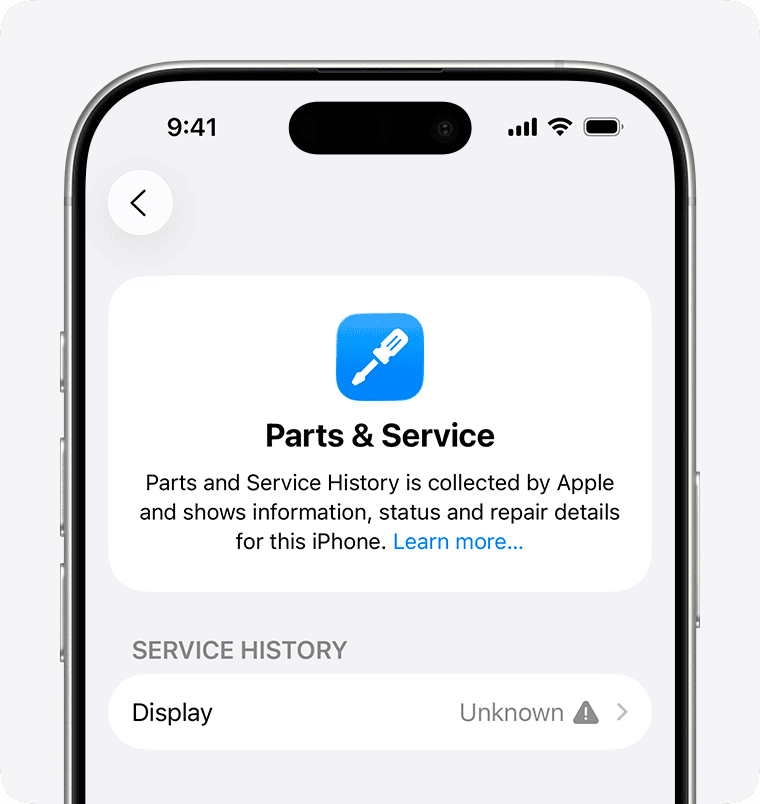
I’ve seen this issue trip up even experienced technicians. A client of mine in Mexico recently learned this the hard way. It's a small detail that makes a huge difference in customer satisfaction. So, let’s break down exactly what’s going on and how you can avoid these headaches for good.
Why do iPhones show “Unknown Part” after a repair?
Is the "Unknown Part" message confusing your customers? This warning makes a perfect repair look unprofessional and can lead to unnecessary callbacks and complaints from your clients.
iPhones show "Unknown Part" because Apple pairs components like the screen and battery to the logic board using unique serial numbers. When you install a new part, even a genuine one from another phone, the system detects a mismatch and displays the warning. It's a security and control feature.
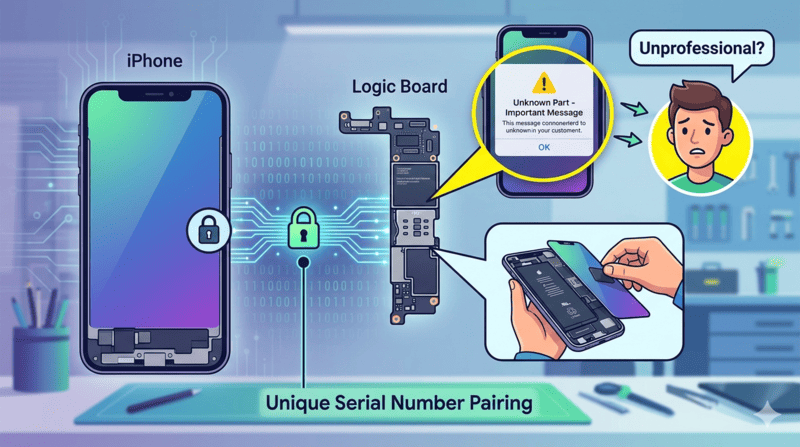
Apple started doing this to have more control over the repair process. Each critical component in a new iPhone has a unique serial number. This number is electronically "married" to the phone's main logic board at the factory. When you turn the phone on, the iOS software quickly checks if the serial numbers of the installed parts match the ones stored on the logic board. If they don't match, the system assumes the part is not the original one and flags it.
What Data Does Apple Check?
The system isn't just looking for one number. It checks a few key pieces of information to confirm a part's identity.
- Component Serial Number: The most basic unique identifier for the part.
- Calibration Data3: Information that helps the part work correctly with the specific phone, like color data for screens (True Tone).
- Factory Pairing Info4: A secure digital handshake that proves the part was installed by Apple.
This affects more than just a simple warning message. It can also disable important features.
| Part | Consequence of Mismatch | Affected Models (Generally) |
|---|---|---|
| Screen | "Unknown Part" Message, Loss of True Tone | iPhone 11 and newer |
| Battery | "Important Battery Message", No Battery Health % | iPhone 12 and newer |
| Camera | "Unknown Part" Message, Potential Function Loss | iPhone 12 and newer |
This is why even a high-quality standard replacement part will trigger the warning. The part itself might be perfect, but it doesn't have the secret digital handshake that the iPhone is looking for.
What is a diagnostic screen?
Tired of explaining the "Unknown Part" message for screen repairs? This issue undermines the quality of your work and makes customers doubt the parts you use.
A diagnostic screen is an aftermarket or refurbished screen that has been specially programmed. It allows the iPhone's system to recognize it as a genuine part, bypassing the "Unknown Part" warning and restoring features like True Tone. It's the key to a seamless repair experience.
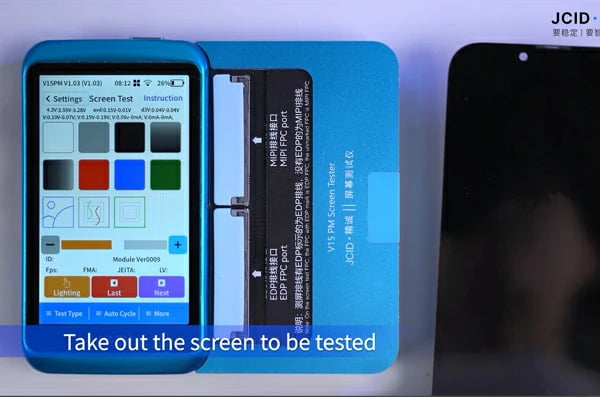
Think of a diagnostic screen as a screen with a "digital key." A standard aftermarket screen is like a perfectly cut key that doesn't have the electronic chip to start the car. It fits, but the car's computer rejects it. A diagnostic screen has that electronic chip programmed and ready to go. This is achieved by either copying data from an original screen or by using special ICs (Integrated Circuits) that come pre-loaded with compatible data. For your repair business, this means you can offer a premium repair without needing complex tools or skills.
How Does It Compare to Other Solutions?
There are three main ways to handle a screen replacement on a newer iPhone. Each has its pros and cons for a repair shop.
| Solution | "Unknown Part" Warning | True Tone Function | Technician Skill Level |
|---|---|---|---|
| Standard Aftermarket Screen5 | Yes | No | Basic |
| IC Transfer6 | No | Yes | Advanced (Microsoldering) |
| Diagnostic Screen | No | Yes | Basic |
The IC transfer method requires a technician to physically remove the small touch IC from the original broken screen and solder it onto the new screen. This is time-consuming, requires expensive equipment, and carries a high risk of damaging the new screen. A diagnostic screen from a reliable supplier like FIZON gives you the same great result as an IC transfer but with a simple plug-and-play installation.
What is a diagnostic battery?
Are customers complaining about missing battery health info after a replacement? This makes your service seem incomplete and can damage your reputation for quality, professional repairs.
A diagnostic battery is a replacement battery that has its data reprogrammed. This makes the iPhone recognize it as the original, restoring the "Battery Health7" feature in settings and removing the "Important Battery Message." It provides a factory-like replacement experience for your customer.
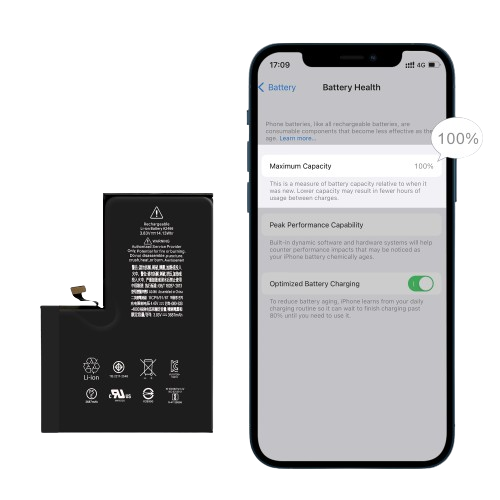
The secret to an iPhone battery is not just the battery cell itself, but the small circuit board attached to it. This is called the Battery Management System8 (BMS). The original BMS board holds all the pairing information that the logic board looks for. A standard replacement battery has a new cell and a new BMS, which is why the phone immediately detects it as an "Unknown Part." Diagnostic batteries solve this problem in a couple of ways, but the most popular method today is the "tag-on flex" solution. This is a small, smart flex cable that is installed with the new battery. It holds the necessary programming to tell the iPhone's system, "Everything is okay, show the battery health at 100%."
Why This is a Game-Changer for Shops
This method is incredibly beneficial for repair businesses.
- No Soldering Required: Unlike the old method of spot-welding the original BMS onto a new cell, the tag-on flex solution is solder-free. It's a simple plug-in installation that any technician can perform quickly.
- Restores Customer Confidence9: When a customer pays for a new battery, they expect to see "100%" in their battery health settings. A diagnostic battery delivers that expected result.
- Creates a Premium Service: You can offer a standard battery replacement and a premium diagnostic battery replacement at a higher price, giving customers a choice and increasing your average repair value.
At FIZON, our diagnostic batteries use this reliable and easy-to-install tag-on flex technology to ensure your repairs are fast, professional, and profitable.
Used vs Genuine vs Unknown: What do they mean?
Confused by the terms "Used," "Genuine," and "Unknown" in iPhone settings? This language can create distrust and confusion for both you and your customers if not understood correctly.
"Genuine" means the part is the original one paired at the factory. "Used" can refer to a genuine part from another device, which will still trigger a warning. "Unknown Part" appears when any new, un-paired part is installed. The key is the electronic handshake, not the origin of the part.
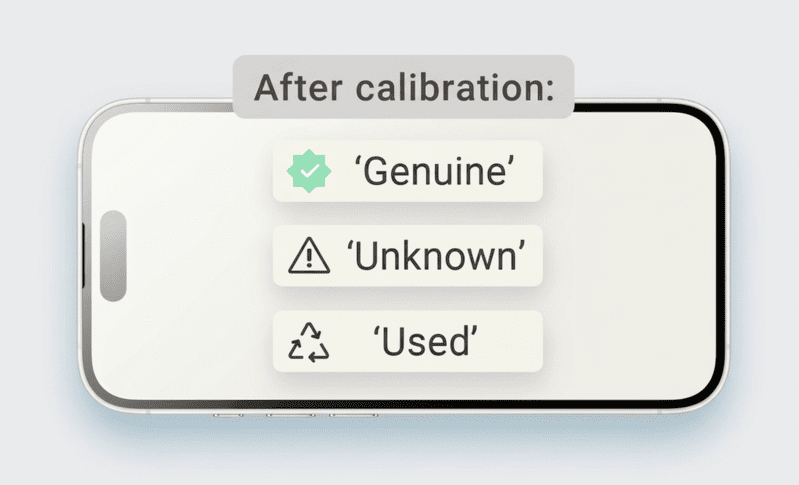
This is a common point of confusion, and it can cause major problems. I remember my client in Mexico who bought a batch of iPhone 15 Pro Max "original used" screens from another supplier. He thought "original" meant they would work perfectly. But when he installed them, his customers saw the "Unknown Part" message and lost True Tone. The supplier hadn't programmed the screens; they were just raw parts pulled from other phones. This mistake damaged his reputation and cost him money. The label of the part doesn't matter as much as its programming.
Understanding the Terms Clearly
Let's break down what each term really means for you and your customer.
| Term | What It Really Is | System Message in Settings | Key Takeaway for Shops |
|---|---|---|---|
| Genuine10 Part | The original component from that specific phone. | None. All functions work. | This only applies to the part that came in the phone from the factory. |
| Used Part11 | An original Apple part taken from a different phone. | "Unknown Part12" message appears. | "Original" or "Used" does not prevent the warning message. It needs programming. |
| Aftermarket Part13 | A brand new part made by a third-party company. | "Unknown Part" message appears. | This is the standard replacement, best for budget repairs where the warning is acceptable. |
| Diagnostic Part | A new or refurbished part that is specially programmed. | None. All functions work. | This is the best solution for a professional, warning-free repair. |
The most important lesson here is that you cannot simply install a part from another iPhone, even if it's an original Apple part, and expect it to work without warnings. It must be a diagnostic part that has been prepared to communicate correctly with the phone.
How do repair shops use diagnostic parts?
Want to offer premium repairs without the headache of complex microsoldering? Juggling different part qualities and customer expectations can be a major operational drag on your shop.
Repair shops use diagnostic parts as a premium, plug-and-play solution. They install them just like any other part, but the result is a repair with no system warnings and full functionality. This simplifies inventory, reduces repair time, and justifies a higher price point.

For a busy repair shop owner like Josh in Australia, efficiency is everything. He can't afford to have his best technician tied up for an hour on a risky IC transfer when they could complete three simple screen replacements in the same amount of time. This is where diagnostic parts change the entire workflow. The installation process becomes as simple as it was for older iPhone models. There's no need for expensive programmers or microsoldering stations at the repair desk.
The New, Simplified Workflow
- Order: You order the specific Diagnostic Screen or Battery you need from a trusted supplier.
- Open: You open the customer's device as you normally would.
- Install: You disconnect the old part and connect the new diagnostic part. The connectors are identical.
- Close & Test: You close the device, turn it on, and check the settings. There are no warnings, True Tone works, and battery health shows 100%.
This simplicity allows you to create a tiered service offering. You can give customers a choice: a lower-cost "Standard Repair" using a regular aftermarket part (and you explain the warning message they will see), or a "Premium Repair" using a diagnostic part for a seamless, like-new experience. This strategy increases your revenue per customer and positions your shop as a high-quality, expert service provider.
Diagnostic parts vs standard aftermarket parts?
Are standard aftermarket parts hurting your business's reputation? The low price is tempting, but that persistent "Unknown Part" warning can make you look cheap to your customers.
The main difference is programming. Standard parts lack the data to communicate with the iPhone's iOS, triggering a warning. Diagnostic parts are pre-programmed to be recognized, eliminating the warning and restoring full function. It's the difference between a functional repair and a professional one.
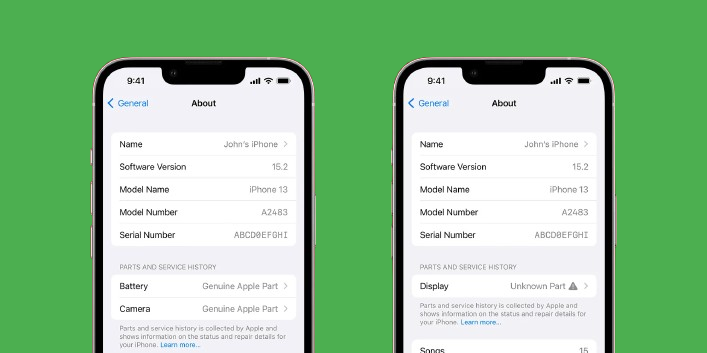
When a customer comes to you for a repair, they are trusting you to restore their expensive device to its original state. Seeing a permanent error message in their settings breaks that trust. It makes them think you used a cheap, low-quality part, even if the screen's display quality is excellent. A diagnostic part costs a little more upfront, but it's a direct investment in your brand's reputation and in customer satisfaction. For a growth-focused business, protecting your reputation is far more valuable than saving a few dollars on a single part.
A Clear Comparison
Let's put them head-to-head. The choice you make directly impacts how your customer perceives the quality of your work.
| Feature | Standard Aftermarket Part | FIZON Diagnostic Part |
|---|---|---|
| System Warning | Yes ("Unknown Part") | No |
| True Tone (Screens) | Usually lost | Restored |
| Battery Health % | Not available | Restored (Shows 100%) |
| Installation Skill | Basic (Plug-and-play) | Basic (Plug-and-play) |
| Cost | Lower | Higher |
| Customer Perception | Budget, potentially low-quality | Premium, professional, like-original |
| Best For | Customers on a very tight budget | Customers who value quality, business growth |
For a professional repair business that wants to build a loyal customer base, the choice is clear. The small additional cost for a diagnostic part pays for itself by preventing customer complaints, negative reviews, and callbacks. It allows you to confidently charge a premium for a superior service.
Which iPhone models support diagnostic parts?
Unsure which iPhone models need special parts to avoid warnings? Ordering the wrong part for a newer iPhone can lead to wasted inventory, angry customers, and lost time.
Diagnostic parts are primarily needed for iPhone models starting with the iPhone 12 and newer. Apple intensified its part serialization with these models. For older models like the iPhone X, a standard high-quality aftermarket part usually works without triggering system warnings.
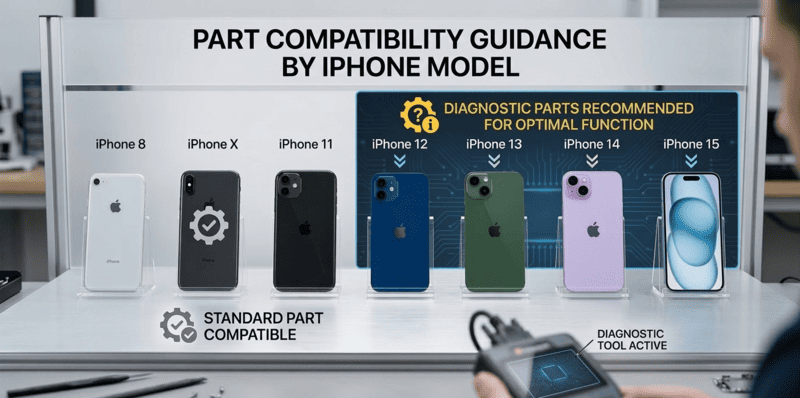
This is one of the most important pieces of information for any parts buyer or technician. You need to know when to order a standard part and when you absolutely must order a diagnostic part to meet customer expectations. Apple has been slowly tightening its grip with each new generation of iPhone. What worked for an iPhone X repair will not work for an iPhone 14 repair. As a supplier, we at FIZON make this easy by clearly labeling our parts, but it's crucial for you to know the breakdown.
Quick Reference Guide
Here is a general guide to which parts require a diagnostic version to avoid warnings.
-
Models Where Diagnostic Parts Are Essential:
- Battery: iPhone 12 and all newer models (13, 14, 15, 16, 17 series).
- Screen: iPhone 11, 11 Pro, 11 Pro Max, and all newer models. (Note: True Tone serialization started with the iPhone 8, but the "Unknown Part" warning became standard from the 11 series onward).
- Camera: iPhone 12, 12 mini, 12 Pro, 12 Pro Max, and all newer models.
-
Models Where Standard Parts Are Often Sufficient:
- iPhone 8, 8 Plus, X, and older. For these models, a high-quality standard replacement part will not trigger the "Unknown Part" or "Important Battery Message" warnings, though True Tone programming is still needed for screens.
Always double-check the model before ordering. This simple step will save you from the headache of having the wrong part on hand when the customer is waiting.
What are the risks and limitations of diagnostic parts?
Are diagnostic parts a perfect, future-proof solution? While they solve the biggest problems in modern iPhone repair, it's crucial to understand their limitations to manage your own and your customers' expectations.
The main risk is a future iOS update; Apple could release software that detects and blocks current diagnostic methods. The other key factor is supplier reliability. You need a partner who provides consistently high-quality, correctly programmed parts, as quality varies wildly between vendors.

The third-party repair industry is in a constant cat-and-mouse game with Apple. We develop a solution, and Apple looks for a way to close it in a future update. However, the repair community is resilient and innovative. While a risk exists, solutions are almost always found quickly. The bigger, more immediate risk for a repair shop is choosing the wrong supplier. A cheap batch of diagnostic parts that were programmed incorrectly is useless. That's why at FIZON, we focus so heavily on quality control and testing to ensure every diagnostic part we ship works exactly as promised.
The Future of iPhone Repair
While diagnostic parts are the best solution today and the clear trend for 2024-2026, especially Diagnostic SOFT OLED screens and batteries, we are always looking ahead. I believe the next evolution in repair will follow two paths:
-
Data-Transfer Screens: The repair process will involve a simple programmer tool. You'll plug the customer's original broken screen into the tool to read its unique data, then plug in the new screen to write that data onto it. This creates a perfect digital clone that the iPhone accepts without issue.
-
Pre-Programmed Screens: This is the ultimate goal. The replacement screen will arrive from your supplier already programmed with universal data that is compatible with the iPhone system. The repair becomes truly plug-and-play, with no tools or data transfer needed.
We are already investing heavily in the research and development of these next-generation solutions. Our goal is to keep our clients ahead of the curve, making sure you always have the parts you need to run a successful, profitable repair business.
Conclusion
Diagnostic parts solve the "Unknown Part" issue, boosting customer trust and your shop's reputation. Choosing the right diagnostic part and a reliable supplier is key to staying competitive and profitable.
Learn how diagnostic parts can enhance your repair services and eliminate common warnings. ↩
Understanding True Tone can help you explain its importance to customers and enhance their experience. ↩
Understanding Calibration Data can help you ensure proper functionality after repairs. ↩
Explore the importance of Factory Pairing Info in maintaining iPhone functionality. ↩
Explore the characteristics of Standard Aftermarket Screens and their limitations. ↩
Learn about the IC Transfer method and its pros and cons for iPhone repairs. ↩
Explore methods to restore the Battery Health feature and improve customer satisfaction. ↩
Understanding the Battery Management System can help you provide better battery replacements. ↩
Learn strategies to restore customer confidence and improve satisfaction after repairs. ↩
Discover the significance of Genuine parts and how they affect repair quality and customer trust. ↩
Clarify the meaning of Used Part and its implications for repair quality. ↩
Understanding the cause of the Unknown Part warning can help you avoid it and improve customer satisfaction. ↩
Learn about Aftermarket Parts and their impact on repair quality and customer perception. ↩