

Replaced an iPhone part and now see a warning? This “Unknown Part” message can be worrying, making you question the quality of the repair. Let’s break it down.
The "Unknown Part" message appears when a non-Apple-serialized part is installed. Apple pairs components like screens to the logic board. This message is a notification, and for screens, it usually only disables True Tone1. The phone's core functions remain unaffected with a quality replacement part.
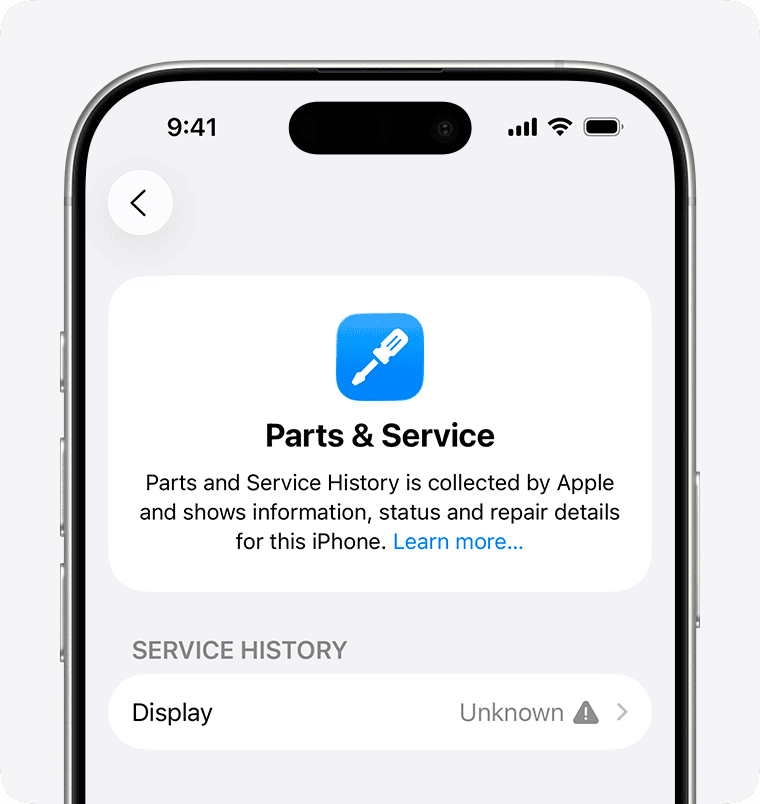
That simple message can cause a lot of headaches, especially for my clients who run repair businesses. I've received countless emails and calls about it. A customer sees that warning and immediately thinks something is wrong with the part you just installed. It creates doubt and forces you to explain the situation over and over. But why did Apple even start doing this, and what does it really mean for your repair business?
Why Does Apple Show the "Unknown Part" Message?
Confused why Apple flags a perfectly good new screen? It can feel like they are punishing you for choosing an independent repair2. The real reason is all about control and serialization.
Apple shows this message because it cannot verify the new part's serial number against its database. Since the iPhone 11, key parts are "serialized" or paired to the logic board. Only Apple and its authorized providers can perform a repair that avoids this message.
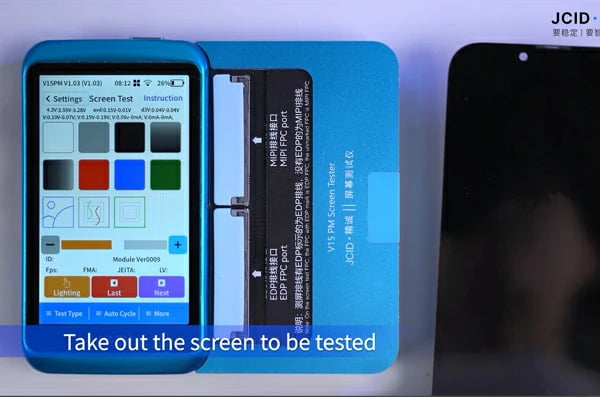
Let's dive deeper into this. Apple's system of "serializing" parts is a core part of their repair strategy. Think of it like a digital handshake. The iPhone's main brain, the logic board, has a list of serial numbers for its original parts, like the screen, battery, and camera. When the phone turns on, it checks if the connected parts have the right serial numbers. If you install a new screen, even a top-quality one from us at FIZON, its serial number won't match what the logic board expects. The phone still works, but the software flags this mismatch and shows the "Unknown Part" message.
I remember when this started with the iPhone 11. A long-time customer in Germany called me, totally frustrated. He said, "Lion, I used your best OLED screen. The quality is perfect, but my customer is freaking out about this message." That's when we knew we had to start educating our partners on how to handle this.
Here’s a simple breakdown of the reasons:
| Apple's Stated Reason | Impact on Independent Repair |
|---|---|
| Ensuring Genuineness | Makes high-quality third-party parts seem "fake." |
| Safety and Performance | Implies independent repairs are unsafe, even when using quality parts. |
| Security | Creates a closed system that limits consumer choice. |
| Protecting Features | Used to disable features like True Tone, pushing customers to them. |
Ultimately, it's a business strategy. It guides customers toward Apple's own, more expensive, repair network3. But for your business, it's just another hurdle to overcome.
Does an "Unknown Part" Warning Affect Your iPhone's Performance?
Worried the "Unknown Part" message means your phone is now broken or unsafe? You might think the new screen will fail or cause other problems. Let's clarify what is actually affected.
For a screen replacement, the "Unknown Part" message typically only disables the True Tone feature. Core functions like touch sensitivity, display quality, and Face ID are not affected by the message itself, provided you use a high-quality replacement screen.
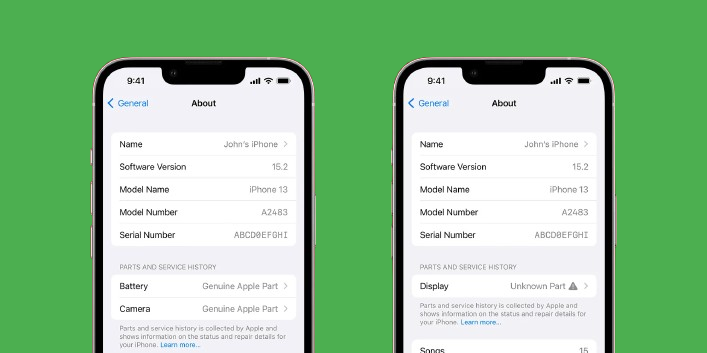
This is the most important point to communicate to your customers. The warning is a software notification, not a hardware failure report. I had a client in Spain, who runs a large repair chain4, test this extensively. He took one of our INCELL screens and one of our Soft OLED screens and put them through every possible test after installation. His conclusion was clear. The only functional loss was True Tone. His customers, once they understood this, cared far more about the excellent visual quality and the money they saved.
Let’s be very specific about what changes and what stays the same after a screen replacement triggers the message.
What Is Affected?
- True Tone: This feature automatically adjusts the screen's white balance to match the ambient lighting. Apple's software disables this when it detects a non-serialized screen.
- A Notification: For the first few days, a notification appears on the lock screen. After that, it moves permanently into the Settings > General > About section. It does not interfere with the phone's daily use.
What Is NOT Affected?
- Touch Functionality: Your screen will be just as responsive as before.
- Display Quality: Brightness, color, and resolution are determined by the quality of the replacement screen itself, not the notification.
- Face ID / Touch ID: These security features will continue to work perfectly, as long as the original sensor assembly was transferred correctly during the repair.
- All Other Phone Functions: The camera, speakers, battery performance, and software updates are completely unaffected.
The key takeaway is that a high-quality part from a reliable supplier like FIZON will restore your phone's screen to perfect working order. The message is just Apple's way of letting you know a change was made outside their system.
How Can Repair Shops Explain the "Unknown Part" Message to Customers?
Do customers get angry or distrustful when they see the "Unknown Part" warning? It can undermine your professional work and force you to defend a quality repair. Here’s how to explain it.
Explain to customers that this is a standard message from Apple for any non-authorized repair. Reassure them it's not a sign of a faulty or "fake" part. Emphasize that the screen is a high-quality replacement and only True Tone is disabled by Apple's software.
Communication is everything here. The problem isn't the part; it's the customer's surprise and fear. A customer from Mexico told me this was his biggest headache. He said, "My customers see the message and their heart sinks. They think I've cheated them." We worked together on a simple script, and it changed his business. The key is to be proactive and manage expectations before the customer even sees the message.
Here is a step-by-step guide you can use in your shop:
- Inform Before the Repair: When the customer drops off their phone, tell them upfront. Say something like, "Just so you are aware, because we are an independent shop, Apple's software will show a notification in your settings after the screen is replaced. This is completely normal for all repairs done outside of an Apple Store."
- Explain It Simply: Avoid technical jargon. You can say, "Think of it as a note from Apple. It's not a warning about the quality of the screen we use, but simply a message that the repair wasn't done by them."
- State the Exact Impact: Be clear and honest. "This message has no effect on the phone's performance. The touch will be perfect, and the display will be bright and clear. The only thing Apple’s software turns off is a minor feature called True Tone."
- Reassure with a Warranty: Back up your words with action. "We fully stand by our work. This new screen is covered by our [e.g., 12-month] warranty. The message is just a notification, not a performance issue."
My Mexican customer even created a small info card to hand out with every repair. It briefly explains the message. He told me that customer complaints5 and follow-up questions about it dropped to almost zero. It's all about building trust through clear communication.
Are There Ways to Avoid the "Unknown Part" Message After a Screen Replacement?
Tired of explaining the "Unknown Part" message to every single customer? You might wish there was a technical solution to make the message just disappear. There are methods, but they have trade-offs.
Yes, it's possible for skilled technicians to avoid the message by transplanting the original screen's microcontroller IC chip6 onto the new screen. This complex microsoldering7 procedure preserves the original serial number, tricking the iPhone into recognizing the new screen as original.
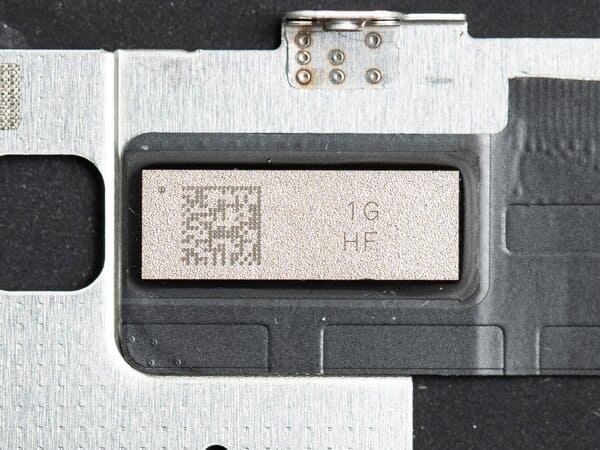
This is a very advanced repair technique. It involves carefully removing a tiny chip from the original, broken screen and soldering it onto the new replacement screen. This chip holds the screen's unique serial number. By moving it over, the iPhone's logic board thinks it is still connected to the original screen. This not only removes the "Unknown Part" message but also restores the True Tone function.
However, this is not a simple solution for every repair shop. We have a few specialized clients in North America and Europe who offer this as a premium service. For most shops that focus on quick, reliable, and high-volume repairs, the risks often outweigh the benefits.
Here’s a comparison to help you decide if it's right for your business:
| Factor | Standard Screen Swap | IC Chip Transfer |
|---|---|---|
| Skill Level | Basic to Intermediate | Advanced (Microsoldering) |
| Time Required | 15-30 minutes | 60-90+ minutes |
| Equipment | Standard repair tools | Microsoldering station, microscope |
| Risk | Low | High (risk of damaging IC or new screen) |
| Cost to Shop | Standard part cost | Higher labor cost, risk of failed repair |
| Final Result | "Unknown Part" message, no True Tone | No message, True Tone restored |
For the vast majority of repair businesses8, the most efficient and profitable path is to use high-quality screens and master the art of customer communication9. Focusing on a great repair and educating the customer is a more scalable business model than investing in high-risk microsoldering7 procedures.
Conclusion
The "Unknown Part" message is Apple's software notice, not a hardware flaw. Educating your customers is key to building trust and successfully growing your independent repair business.
Discover how True Tone works and why its functionality may be affected by repairs. ↩
Understanding these challenges can help you strategize for success. ↩
Understanding Apple's network can help you navigate the repair landscape. ↩
Explore the advantages of operating a repair chain for business growth. ↩
Learn strategies to reduce complaints and improve customer satisfaction. ↩
Understanding this component can help you grasp advanced repair techniques. ↩
Learn about this advanced technique and its potential benefits and risks. ↩
Discover strategies for success in the independent repair industry. ↩
Effective communication can enhance customer trust and satisfaction in your services. ↩