
Are you tired of the confusion from Apple's part messages? This uncertainty complicates customer conversations and can even impact your shop’s reputation, making every repair a potential debate.
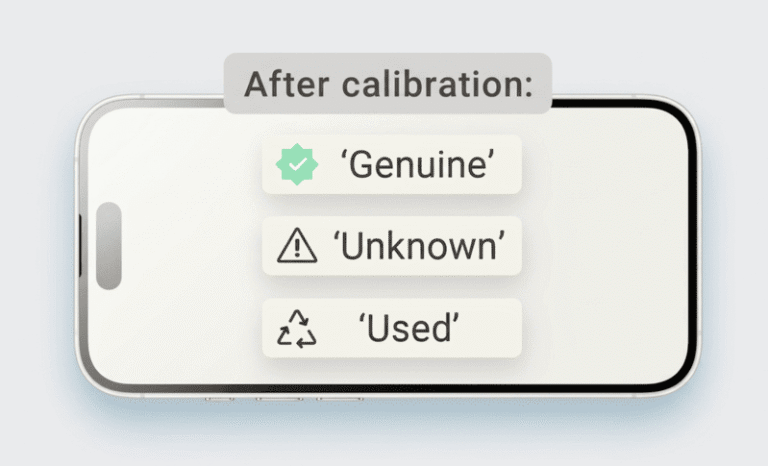
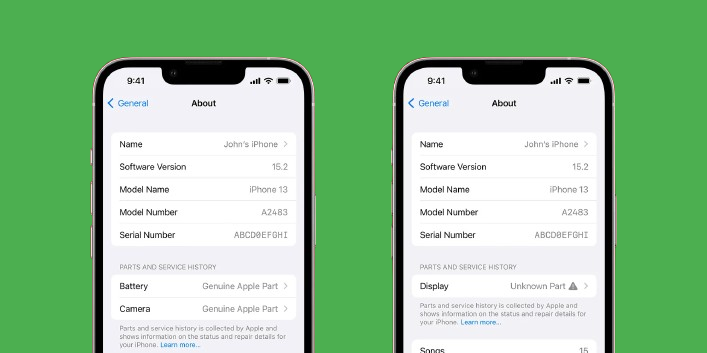
The "Genuine," "Used," or "Unknown Part" message on an iPhone indicates how the device's software recognizes a replacement component. "Genuine" means a new, Apple-serialized part is paired. "Used" means an original but previously used part is detected. "Unknown" means the part is not recognized by Apple's diagnostics.
As a repair business owner, you're constantly balancing part quality, cost, and customer satisfaction. These new part notifications from Apple add another layer to that challenge. It's not just about fixing a phone anymore; it's about managing customer perception. I've talked to many clients, from large distributors to local repair shop owners like Sanjai in Australia, and this topic comes up again and again. They need to know what these messages mean for their bottom line and their daily operations. Understanding this isn't just a technical detail—it's a critical piece of business intelligence that can save you time, build trust with your customers, and help you stock your inventory more effectively. Let’s break down what you really need to know.
What Do "Genuine," "Used," and "Unknown Part" Actually Mean?
Do you find the technical differences between these part statuses confusing? This lack of clarity can lead to ordering the wrong parts or failing to explain the situation to customers.
"Genuine" means the iPhone recognizes a new, serialized part. "Used" means it's an original but recycled part. "Unknown" means the part, whether aftermarket or original, failed the diagnostic check1. For screens, technology now allows most types to be programmed to show as "Used."
When Apple introduced part serialization, it changed the game for third-party repairs. The iPhone now runs a diagnostic check every time a key component is replaced. It’s trying to match the serial number of the new part with its own records. This is where the different messages come from. It's less about the physical quality and more about what the software sees. For example, you could install a perfect, high-quality aftermarket OLED screen, but if its serial number isn't registered with the device, it will show the "Unknown Part" message. I want to be very clear about this for my clients, as it directly impacts how you run your business.
Here’s a simple breakdown:
| Part Status | What it Means | Common Part Types |
|---|---|---|
| Genuine | The part is new, original, and its serial number is successfully paired with the iPhone. | New original parts installed by Apple. Batteries can be programmed to show this. |
| Used | The part is original (e.g., from another iPhone) and has been recognized as such. | Original refurbished screens, original pulled screens, and batteries can show this. |
| Unknown Part | The iPhone cannot verify the part's serial number. It could be high-quality or low-quality. | Aftermarket screens (Incell, OLED), and even original parts not correctly programmed. |
It's important to note that for screens, it is currently impossible to program them to display "Genuine." However, new programming tools allow us to make high-quality aftermarket, original refurbished, or pulled screens appear as "Used." This gives you a powerful option to offer customers.
How Does This Affect Your Repair Shop's Operations and Customer Trust?
Does the "Unknown Part" warning create awkward conversations with your customers? This message can make clients doubt your work, forcing you to spend valuable time explaining technical details.
The "Unknown Part" message forces repair shops into lengthy explanations, which hurts efficiency and can erode customer trust. Customers often perceive the warning as a sign of a low-quality repair, even if the part functions perfectly, which can negatively affect their phone's resale value.
I remember a call with a long-time client who runs a chain of repair shops in France. He was frustrated. "Lion," he said, "every other customer with a new iPhone model asks about this 'Unknown Part' message. My technicians are spending more time being teachers than technicians!" This is a real problem. Your goal is to get customers in and out with a working phone and a smile. But when you have to stop and give a five-minute lecture on Apple's serialization policies, you lose momentum. It slows down your workflow and prevents you from helping the next person in line. More importantly, it can plant a seed of doubt. No matter how well you explain it, some customers will just hear "the part is not genuine" and assume you used a cheap, faulty component. This undermines the trust you've worked so hard to build and can directly impact the perceived resale value of their device. They worry that a future buyer will see the message and offer them less money. This isn't just an inconvenience; it's a direct threat to your shop's efficiency and credibility.
How Can You Strategically Manage Your Screen Inventory Now?
Are you struggling to decide which types of screens to stock for newer iPhones? Choosing incorrectly can lead to dead inventory or unhappy customers, both of which hurt your profits.
Strategically manage inventory by offering two tiers: high-quality screens programmed to show "Used" for discerning customers, and standard aftermarket screens2 that show "Unknown Part" for budget-focused repairs. This balances cost, customer perception, and inventory risk, giving your clients clear choices.
The key to navigating this new landscape is to be strategic. You don't have to choose just one type of screen. In fact, that's a risky move. At FIZON, we advise our partners to adopt a tiered inventory approach. For customers who are sensitive about the warning message and concerned about resale value3, you should stock screens that can be programmed to show as "Used." These are often original refurbished or premium aftermarket screens4 that, with the right tools, will pass the diagnostic check as a recycled part. This is your premium offering. It costs a bit more, but it completely avoids the awkward "Unknown Part" conversation.
On the other hand, you will always have customers whose primary concern is price. For them, a standard, high-quality aftermarket screen (like Incell or a good soft OLED) is the perfect solution. Yes, it will trigger the "Unknown Part" message, but you can position it as your cost-effective repair5 option. The key is to be transparent and present it as a choice. By offering both, you empower your customers. You're not just a repair person; you're a solutions provider. This approach allows you to capture both ends of the market, reduce the risk of having the "wrong" inventory, and turn a potential problem into a sales opportunity.
Conclusion
Understanding these iPhone part messages is vital. It helps you manage customer expectations, streamline your repairs, and stock inventory wisely to grow your business's credibility and profitability.
This link explains the diagnostic check process and its importance for repair shops. ↩
Explore the pros and cons of aftermarket screens to make informed decisions for your repairs. ↩
Understanding the impact of repairs on resale value can help you guide your customers better. ↩
Learn about premium aftermarket screens and how they can benefit your repair offerings. ↩
This resource will help you identify cost-effective repair options that satisfy budget-conscious customers. ↩